Author Archive

Mike McCrosky

Kicking around in technology since 2002. I like to write about technology products and ideas, but at the consumer level understanding. Some tech, but not too techie. Posting on Quora.com as well.

USB Duplicator is 20 Target Time Saver

Nexcopy’s 20-Target USB Duplicator Delivers Speed and Efficiency for IT Teams

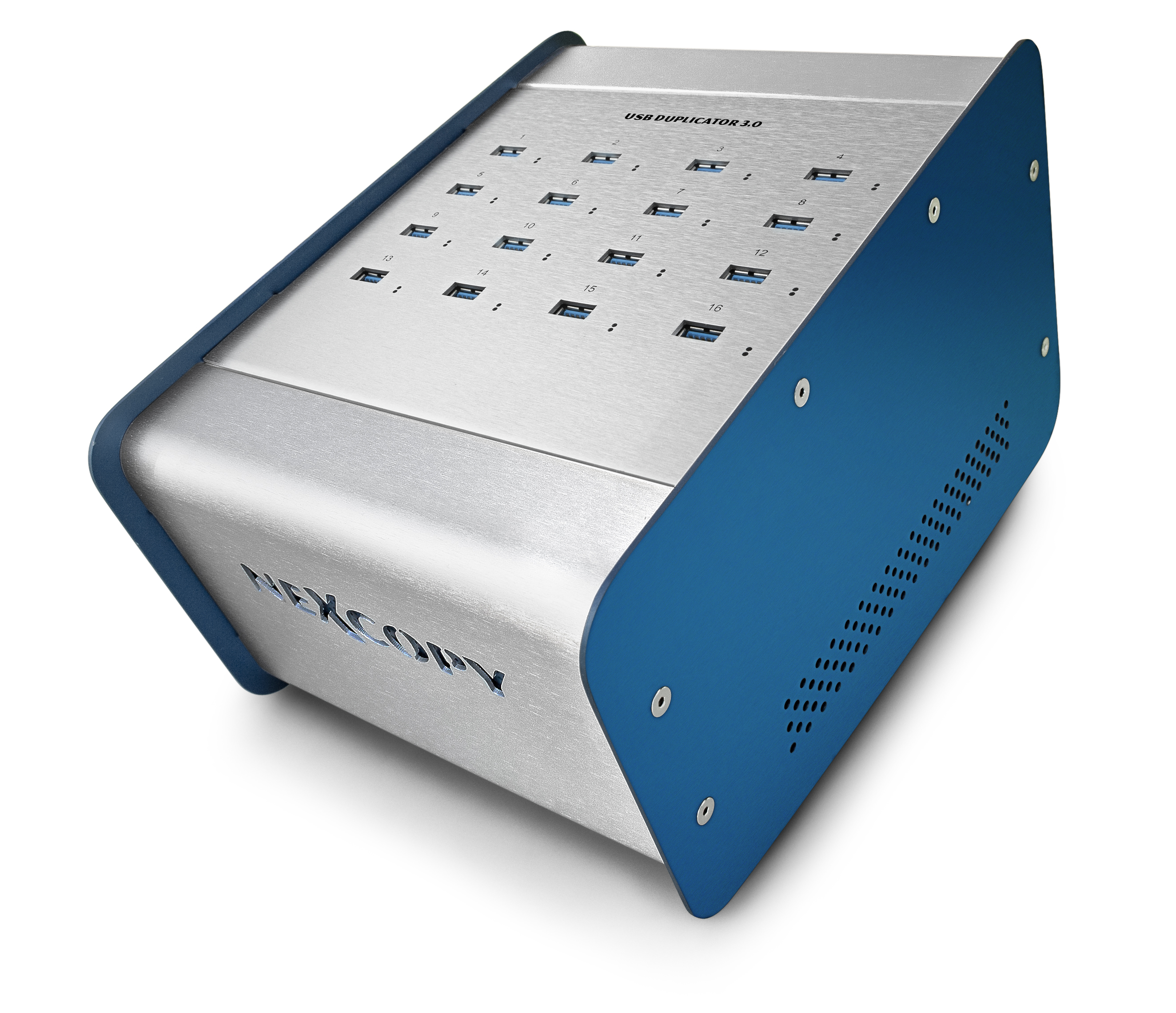
We’ve heard of a USB port replicator which is a fancy word for dock station, but now we have a USB Duplicator from Nexcopy. The USB duplicator is the largest PC-based copier on the market which quickly and easily copies data to flash drives. The average user wouldn’t need this, but this product would be a great fit for many corporations today. Since USB flash memory is such a popular medium for data distribution, the USB duplicator seems like a good investment that would save an IT team a significant amount of time.

USB duplicator with 20 target slots

The Nexcopy USB Duplicator has several different functions like file copy, which copies files and folders from a PC onto the flash drive with the same file structure. Another feature is USB device copy. This is a low-level duplicator with a bit-for-bit copy function. The USB200PC also comes with a Copy Job function so you can set a string of activity such as Format, Copy, Verify, and Volume Name.

The USB Duplicator is powered by Windows PC software written and owned by Nexcopy called Drive Manager. This software suite does a variety of things besides duplication, such as data extraction (reading files off the USB flash drive), unique data streaming to put unique content on each flash drive, formatting, erasing, and making image files of your masters.

Software features for Nexcopy’s USB Duplicator system

  • File Copy
  • Copy Add
  • Data Stream
  • Device Copy – short
  • Device Copy – full
  • Image Copy (.img file)

File Copy

Point the Drive Manager software to any folder on the host computer and everything will be copied over. This is very similar to the drag-and-drop function in Microsoft Windows. Note that Drive Manager runs only on Windows.

Copy Add

With any targets formatted as FAT, FAT32, exFAT, or NTFS, the software can add files to USB sticks which already have data on them. This is a useful feature for large datasets where only a small portion of new content needs to be added.

Data Stream

Use this feature to stream unique data to each flash drive. This is ideal for publishers and medical companies that require bulk loading where each USB stick needs different information. The unique data streaming feature supports both static and dynamic content.

Device Copy – short

Drive Manager uses a binary bit-by-bit copy from a physical master to all connected targets. This includes the MBR (Master Boot Record), partition table, and content. The “short” copy function will only duplicate data clusters detected on the master. For example, if a 64GB flash drive has only 5GB of data, the short function will copy only 5GB instead of the entire 64GB.

Device Copy – full

Using the same bit-by-bit copy method, the full Device Copy function duplicates the entire master to all targets. This is typically required when the master uses a file system Windows cannot read (such as Linux ext3 or ext4) or a proprietary format.

Image Copy (.img file)

Use a digital master file to duplicate content to USB flash drives. By using an image file, you get the same bit-by-bit duplication process without requiring a physical master.

The Nexcopy duplicator has a list price of $1,299, making it the most economical solution for the number of targets it provides: 20.

Source: GetUSB.info.

Continue Reading

SD Memory Cards Should Use Specific Formatting Software

computer userDid you know that SD (Secure Digital) memory cards should use a specific type of formatting software? I didn’t. I’ve been using the typical Windows formatting utility for years now – never seen a problem. However, I found out today that Panasonic has such a software utility. A utility that complies with the SD Memory Card Specification. The SD formatting software is specifically design for this media type and should not be used with other media types such as Compact Flash, USB or Memory Stick. However, the SD formatting software is ideal for SD, SDHC and all the sub sizes including miniSD and microSD. It is difficult to determine exactly what the difference is from the Panasonic website but from our investigation it appears you get two benefits. 1) the card size is formatted correctly to maximize size. The Windows version will make your card slightly smaller and 2) with optimized format the flash memory will perform slightly better. Of the two benefits, it’s difficult to determine how much of a difference a user would really see. Marginal at best. However, if you are anything like me, grab the utility package and give her a try. Panasonic’s webpage for SD Memory Card Formatting Utility. Continue Reading

Flash Memory Lady Bug

Here is a twist on the traditional flash memory card reader.  The flash memoy Lady Bug is a creatively designed card reader with some additional features.

lady bug usb

The little Lady Bug is a microSD card reader, includes a min 5pin data cable and of all things, includes a micro UV money detector light.  Hmmm. Topping it all off, the Lady Bug includes 4GBs of memory so she can be used as a USB drive. Simply click the black “head” button on the front and the wings pop open giving you access to all her parts and features.  All this for just $10. Continue Reading

Solid State Drives Slurp Power Not Save It

As Gizmodo says, “swindled“  That’s what we are all feeling when Tom’s Hardware determined solid state drives don’t save power, they slurp it up like a 64oz soda from 7-11.

solid state drive power

The theory behind SSD (Solid State Drives) would be no moving parts, thus a big power savings.  This thought process seemed particularely promessing for portable laptops.  However, it seems the “moving parts” cousin – our traditional disk drives – do a better job at power management. Tom’s Hardware is drawing some conclusions from their experiment.  Since SSD has an “On or Off” mode this means when your laptop is on, that Solid State Drive is always drawing power; whereas, the old fashion disk drive only draws power when it’s searching for data and thus doesn’t always draw a certain level of power…in fact, these drives are optomized to only pull power at peak search times. Not sure how much water this theory holds, as the disk drives always need power just to know when a request is being made, but hey, Tom’s Hardware has more resources [for both testing and experience] so I’ll take their word at face value for the moment. Continue Reading

TASCAM Sports Rack Mount CF Recorder

Not that a single rack mount unit which can record to CD or CF card is all that ground breaking, the conveninece of taking a live event and dumping to CF instantly is an interesting prospect.  Once more, the TASCAM SS-CDR1 will convert CDDA audio from Compact Disc to Compact Flash.

tascam ss-cdr1

The SS-CDR1 is designed for applications which previously used cassette or MiniDisc recording to transition those digital recordings the CD or Compact Flash cards.  The SS-CDR1 records in WAVE or MP3 formats to Compact Flash media. A slot-loading CD transport is provided CD recording, MP3 conversion and audio transfer. The recorder includes balanced and unbalanced audio inputs and outputs, RS-232 and parallel control and a wired remote control. Price for the SS-CDR1 is set at $599.  WOW – that’s some serious hardware cost for a CF recorder. Continue Reading

Flash Memory Market Not Yet Saturated

kingston ceoDespite many industry players believing both the memory card and USB drive markets are saturated, Kingston Technology company president John Tu recently said substantial business potential still exists. Citing average monthly shipments of 20 million units for both memory cards and USB drives, Tu said the huge shipments imply that these markets are still growing. He thinks memory cards and USB drives serve as a “platform” for consumers to interact with different kinds of content. While many people think memory device makers should pay digital content providers in order to add content to their products, Tu said it should be the providers paying Kingston to distribute content via its well-established sales network, brand and market share. He added in saying that shipments of both memory cards and USB drives are set to expand further in the future. However, Kingston remains cautious about solid-state drives (SSDs). Tu stressed that the company will only tap into segments it is certain will grow, but once it extends a presence, it will produce in big volumes in order to grab a large share of the market quickly. Kingston believes this is the business strategy it is good at. He recalled the deployment in NAND flash as an example, saying that Kingston only made its decision when the market proved to have substantial potential. Source + Photo: Digital Times. Continue Reading

New Sony Memory Stick Is Faster Than Fast

SanDisk is going faster than fast with their new Memory Stick PRO-HG Duo product.  This new Memory Stick line from SanDisk is the fastest format of it’s kind.  So what kind of speed are we talking about?  How about 30MBs per second.  Yep, MBs not Mbts per second.  The sustained transfer speed for both reading and writing is static at 30MBs and it’ll be interesting to see if the spec is the same as the street [experience].

memory stick pro-hg

To put this figure in perspective, the non-HG Extreme III Memory Stick from SanDisk is only able to achieve an 18MBps transfer speed. This new memory card represents an increase of over 50%.
If you want to put that into perspective, check out a dated benchmark from a couple years ago.  Boy how times have changed. The SanDisk Sony Memory Stick PRO-HG Duo is expected to become available late next month with 4GB and 8GB sizes at prices between $90 and $150 respectively. Source:  MobileMag.com. Continue Reading

Compact Flash to Rival SSD?

Sans Digital is delivering a dual Compact Flash design that might rival some solid state drives at half the cost and with significant benefits. What Sans Digital has come up with is putting two Compact Flash cards into a 2.5″ enclosure to make it look and feel like a SSD drive. Using two 16GB cards and some RAID configuration the dual flash memory becomes a 32GB hard drive. Although this isn’t the biggest drive size, it does rival entry level SSD storage devices.

sans digital compact flash

So here’s the kicker; putting two high performance Sandisk Extreme III Compact Flash cards together would only cost a user about $360. Compare that cost outlay with a $860 SSD drive [of about the same storage size] and you’ve got yourself a clear winner on what direction to take.
“Unlike existing RAID units that employs hard drives for storage space, the CompactSTOR CS1T utilizes pocket-sized lightweight Compact Flash cards as storage memory for data safekeeping. Designed with the same size and connectors as a 2.5” SATA hard drive, the CS1T is compatible with the hard drive slot of laptops, industrial PCs (IPC), small form factor computers, and 2.5” hard drive enclosures.”
In addition, the Compact Flash configuration has lower power consumption and less noise and heat output. The only issue we see is the performance difference between the two. The entry level SSD storage units average [according to spec] about 90Mbytes/s write whereby the Sans Digital solution is about a 3rd less at 30Mbytes/s write speed. The Sans Digital product is called the CompactSTOR and retails for about $45 for the dual bay Compact Flash base and enclosure, memory, of course, is sold seperately. Continue Reading

Crack Your Password Protected SD Card

Ya, that’s right…sometimes you need to crack your own flash memory.  In this case, what if you have a password protected SD card?  Well, the crafty fellows at USBFever have a solution which requires a USB port and a card reader adapter.

memory card unlocker

The USB Fever memory card unlocker is designed to crack your code and get back that flash memory you’ve been locked out from.  The draw back, which I believe is appropriate punishment on forgetting your password, is the unlocker wipes your card clean of any data.  If the data is that important you can send the flash card out to be serviced – but are pictures of your mother-in-law that important?  Doubt it. USB Fever memory card unlocker product page. Continue Reading

Ricky Martin microSD Card – Did You Read That Right?

Yes, you read it correctly.  Ricky Martin and Kingston Technology have teamed together to bring one of the first music albums to the microSD format.

ricky martin microsd

The Ricky Martin microSD card comes with exclusive preloaded music is a 1GB size that features 2 free songs, a video clip and photos from Ricky Martin’s Black & White tour. The microSD card includes a USB reader so users can instantly access the card from a host computer or laptop, or connect the microSD card directly into their MP3 compatible phone or PDA. Comment from Ricky Martin:
“I am very excited by the new avenues for sharing music that technology continues to provide,” said Ricky Martin. “I enthusiastically embrace these new formats. They mean global growth for not only my music — but for all music — and that’s why I’m very happy to form this alliance with Kingston.”
Comment from Kingston rep:
“The microSD Ricky Martin Live Card from Kingston is an innovative way for savvy consumers to enjoy Ricky Martin’s music,” said Seth A. Schachner, Vice President, Digital Business Latin America, Sony BMG Music Entertainment. “It’s also a terrific, versatile product to boot.”
The 1GB Ricky Martin microSD card is available at Amazon for only $11.  Ricky Martin fans rejoice! Continue Reading

Copyright © 2011-2019 by
USB Powered Gadgets and more…
All rights reserved.

SD Card Duplicator Equipment

GetFlashMemory.info has reviewed SD Card Duplicators by Nexcopy.  Our results found the product to be reliable, fast and accurate.

They manufacture both PC connected and standalone systems to fit any type application

Turn your product into a custom USB shape. Right down to the last detail. Click to see over 30 examples of custom shape USB drives.

Twitter One

Twitter Four