Kicking around in technology since 2002. I like to write about technology products and ideas, but at the consumer level understanding. Some tech, but not too techie.
Posting on Quora.com as well.
Kingston Technology, based in Fountain Valley California, will become the majority shareholder in a joint venture set up with Phison Electronics, one of its Taiwanese suppliers.
Phison Electronics will sell its shares in the joint venture called Kingston Solutions, Inc. (KSI) to the Fountain Valley company, which announced the transaction earlier today, August 11, 2020. The deal is worth nearly $60.3 million US.
Kingston, a maker of memory products for computers and consumer electronics, is Orange County’s largest private company. The firm, led by co-founder and chief executive John Tu, had revenue of $12.8 billion last year.
In general terms the TF card and microSD card are the same. They are the same in physical size and same in most technical terms. The two devices may be used in exchange with each other.
There are some technical differences between the two which will be explained later, for now, the biggest difference between a TF card and microSD card is the history of the name.
The TF card came out first. TF card or T-Flash or TransFlash was first to market from SanDisk in 2004. SanDisk, in partnership with Motorola, created the TF card specification. The TF card was the smallest read/write memory form factor and was designed for mobile devices (thus the small size).
TF cards are based on NAND1 memory. The TF card did not last long. At the end of 2004 the Secure Digital Association, which is the governing body over Secure Digital media, absorbed the TransFlash technology and re-branded as: microSD.
This implies, the life of the TF card ended in late 2004 and the microSD card has been available ever since. This will explain why you cannot find a “TF” branded card today (2020). The other reason you cannot find TF cards today is the maximium size of only 16MBs or 32MBs at the time of production. Today you cannot find any memory device with that small of gigabyte capacity.
Here is the technical difference between the two: Micro SD cards can support SDIO mode, which means they can perform tasks unrelated to memory, such as Bluetooth, GPS, and Near Field Communication. Whereas a TransFlash card cannot perform this kind of task.
SDIO mode stands for Secure Digital Input Output, a type of Secure Digital card interface. It may be used as an interface for input or output devices.
The SD Association devised a way to standardize the speed ratings for different cards. These are defined as ‘Speed Class’ and refer to the absolute minimum sustained write speeds. Cards can be rated as Class 2 (minimum write speed of 2MB/s), Class 4 (4MB/s), Class 6 (6MB/s) or Class 10 (10MB/s). It’s important to note that these are the minimum, so it’s entirely possible a card can achieve faster speeds.
NAND is not an acronym. Instead, the term is short for “NOT AND,” a Boolean operator and logic gate. The NAND operator produces a FALSE value only if both values of its two inputs are TRUE. It may be contrasted with the NOR operator, which only produces a TRUE value if both inputs are FALSE.
Did you know Windows Defender can be setup to scan a USB stick automatically, when it’s plugged in? Below are the steps to make that configuration setup.
By default, Windows 10 does not have this setting configured. We are not sure why, as USB sticks and downloads from internet sites are probably the two most vunerable ways to get a computer infected. Our only guess, is the scan process of a USB stick can take some time, and for a user to have that step done with each connection, could reduce the user experience.
This tutorial will take about three minutes to setup. I would suggest read the rest of this article and when done, go back and perform the few steps required to make the Windows Defender scan for USB flash drives.
We are going to make a Group Policy to scan USB flash drives using Windows Defender.
Let us run the Group Policy editor.
Press the Windows Key + R
Type gpedit.msc and press Enter or OK.
Look for the Administrative Templates under the top Computer Configuration directory, expand this directory (folder)
Scroll down to Windows Components, expand it
In that directory scroll down more and look for Windows Defender Antivirus, expand it
Billy Idol’s Hot In The City is a tune which comes to mind whenever talking about USB gadgets that cool thyself.
With summer coming into full swing, this is a good time for a USB fan mention. Cruising the Amazon website this Aikoper product popped up. At first glance I honestly thought the fan was designed by Apple Computers. The aluminum base, slick black body and the cool grey vents, thought it was from Apple for sure. Wrong!
This USB fan has some unique features we believe everyone will like.
There is no switch for turning the fan on or off. Rather you touch the aluminum base. That is very Apple’esc. A single tap to the base and the USB fan goes into “low speed” mode. A double tap will put the USB fan into “high speed” mode. The third tap will turn the fan off. The touch sensitive base has four rubber pads to insure no vibration during operation.
The fan itself is a dual-blade design. Meaning there are four blades toward the front of the bionic shaped shell and another four blades near the rear of the black shell. The idea here is reducing the device noise while in operation.
The black shell case is convex in design to pull air down and into the system, rather than up and into the system. Although the pitch of the shell isn’t great, we may assume less dust and dirt will come into the system from a pull-down air flow design. The curved shell sits on a the aluminum base with some pitch mobility to angle the fan a bit higher or lower for optimal position while in use.
The Amazon listing has over 1,609 ratings with 61% as a five star product, 13% as four star product and the balance just picky people trying to be overly critical. To give you an idea of product feedback and experience, here are some testimonials from the Amazon listing:
Best practices for sending sensitive files to a third party—and why copy protection is stronger than encryption.
You have a document, video, or audio file with sensitive information and need to send it to someone else. What’s the safest option?
Three common choices come to mind: email, Dropbox, or a USB flash drive.
Sending an email is like sending a postcard. It’s open to interception, and anyone determined enough can read it. Most of the time nothing happens, but relying on luck with sensitive data is risky. Encryption improves email security, but file size limits (usually around 20MB) make it impractical for large videos or datasets. And once decrypted, the file is free to be copied or shared without restriction.
Dropbox solves the size problem by letting you upload large files and share a download link. However, Dropbox doesn’t encrypt files by default. You can password-protect a compressed archive, but the same weakness applies: once decrypted, the file is wide open to manipulation or unauthorized sharing.
That leads to a critical question: Do you trust the recipient?
A short look at Intel’s Windows 10 Compute Stick and where it still makes sense today.
In 2015 Intel introduced the Compute Stick, an HDMI dongle computer designed to run Windows 10. The idea was straightforward: create an ultra-portable PC that plugs directly into a monitor or TV. While never a mainstream success, the Compute Stick found its niche in embedded applications, digital signage, and other IoT-style uses where a compact Windows machine is valuable.
The concept was to provide a low-cost solution for environments that needed Windows without the footprint of a desktop or laptop. PCWorld covered the specs in detail back in 2016, but here we’ll focus on real-world applications where this form factor shines.
For around $120 on Amazon, you can still find Windows 10 sticks capable of running essential software and basic workloads.
Why formatting a USB stick as UDF is possible—but not always recommended.
When you format a USB flash drive in Windows 7 or Windows 10, the common file system choices are FAT, FAT32, or exFAT. NTFS is also offered, but it’s not ideal for removable media as we’ve explained before. The available file system options shown in Windows depend on the capacity of the drive connected.
So why don’t you see UDF on that list?
First, it is possible to format a flash drive with UDF (Universal Disk Format) on Windows. Microsoft simply doesn’t make it a default option—and there are good reasons why.
Important note: formatting a USB drive with UDF will not make it behave like an optical drive. UDF is common in DVDs and optical media, but applying it to a USB stick doesn’t magically turn it into one.
The assumption some users make is that UDF creates a “universal” USB, compatible with Windows, Mac, Linux, Symbian, and other systems. In reality, exFAT already fills that role, offering broad compatibility without the risks tied to UDF.
Why avoid UDF on flash drives?
Lack of robust file system check tools
Known 64GB bug in Windows and Linux (not a UDF spec issue, but an implementation bug)
Wear-leveling problems on SD and USB mass storage devices
Windows XP treats UDF as read-only
The most important drawback is the first one: if a UDF-formatted USB drive is unplugged mid-operation and data is corrupted, there are no tools to properly check or repair the file system. For a medium designed to be portable and frequently removed, that’s a big risk.
How to format a flash drive as UDF in Windows
1. Connect the USB drive and confirm the assigned drive letter.
2. Ensure no programs are accessing the drive.
3. Open Windows Explorer, navigate to the C: drive, and type CMD into the search field. Press Enter. Run as Administrator.
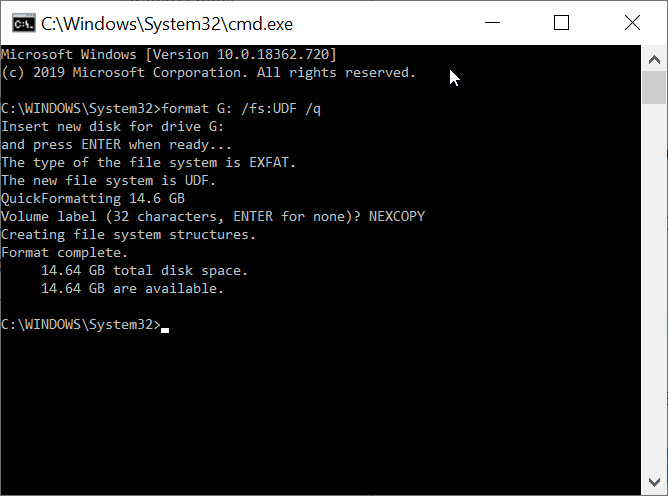
4. In the Command Prompt window, type: format G: /fs:UDF /q
(Replace G with your drive’s letter.)
The /fs parameter specifies the file system (UDF), and /q instructs DiskPart to perform a quick format.
5. Press Enter when asked to confirm the drive is inserted.
6. Enter a Volume name, or leave it blank by pressing Enter.
DiskPart will complete the format and confirm the result. Type exit to close the Command Prompt.
Note: the /q command deletes the file table and root directory, but it does not scan for bad sectors. Combined with the lack of UDF repair tools, this makes the file system especially fragile on portable devices. For most users, exFAT remains the safer choice for cross-platform compatibility.
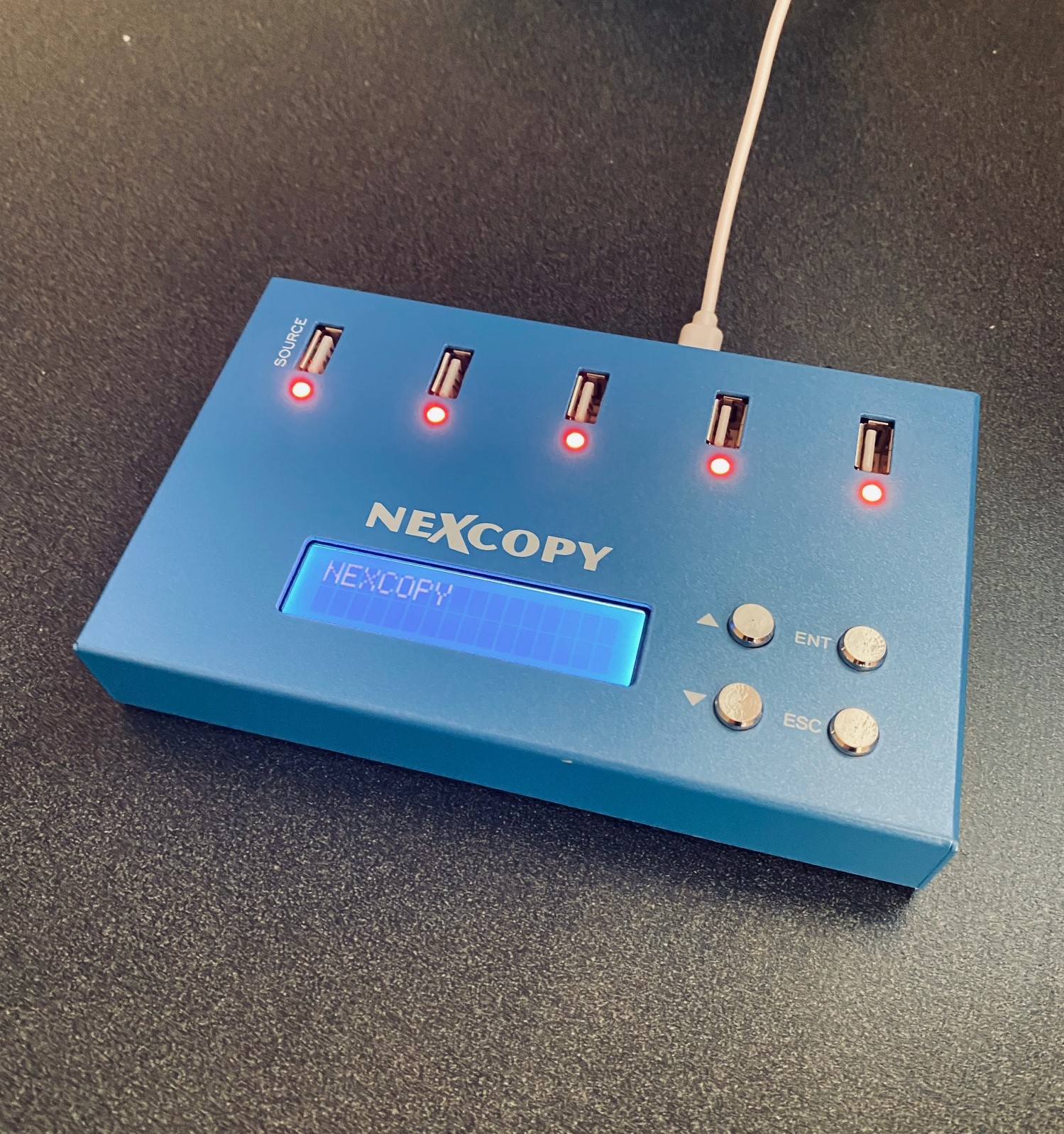
A compact USB flash drive duplicator built for today’s home office needs.
Today more people than ever are working from home. A comfortable environment is great for productivity, but the home office often lacks some of the specialized gear found in corporate IT departments. As businesses shift toward remote setups, certain tools remain essential to keep workflows running smoothly.
Consider an IT manager rolling out restore images, or a software developer pushing updates to remote users. Both scenarios need a way to duplicate USB drives quickly and reliably. That’s where a mini-sized USB flash drive duplicator from Nexcopy fits in.
Why only one Compact Flash Card mounts—and how to fix disk signature collisions.
The most common reason why only one Compact Flash Card is usable when multiple cards are connected is a device signature collision.
If you are dealing with bootable devices and see this problem, the collision is almost certainly the cause. If the devices aren’t bootable, the details below may not apply.
Today Apple announced the new iPadOS will support USB thumb drives. The iPad has long been toughted a workers tablet from Apple, but the relaity is their iPad didn’t provide much functionality. In addition, the devices have limited storage.
With today’s announcement the above argument could get a little muted.
Update: We learned the iPad will allow other storage devices such as external hard drives and SD or microSD cards (with USB adapters). The USB port will also allow for HID devices, such as a USB mouse and keyboard. We are not sure if the iPad will support Bluetooth mouse and keyboard, but we’ve got to assume, right!
There is no word about the connection. The connection could be one of three; an adapter, USB-C socket size or the classic USB type A socket size.